Getting Plex to Actually Play on Apple TV (The Hard Way)
How building an AI system that controls my living room turned into a six-approach engineering saga.
"Hey J.A.R.V.I.S., play Iron Man."
Iron Man plays on the TV.
Simple. Clean. Exactly as it should work.
Getting there took the better part of two weeks of intermittent debugging, six different technical approaches that each failed in their own special way, and a deep dive into a Home Assistant component's source code. I'm writing this up partly because I think it's technically interesting, partly because I suspect I might be one of very few people who has ever had to solve all of these problems simultaneously, and partly because the documentation is living in a markdown file in a private repo and deserves to see daylight.
This is one of those posts where I need to explain what I'm actually building before I can explain the problem.
J.A.R.V.I.S.
I've been building a personal AI assistant and home automation system that I call J.A.R.V.I.S. — it's an AI that controls my home, manages my media, runs on my own hardware, and integrates with everything in my life. The project page is pretty light on detail right now; I've been heads-down building it and haven't had time to document it publicly. More on that soon. But the short version is: it's an MCP server/API/CLI stack running on my homelab that connects to Home Assistant, Plex, my lights, my network, and a bunch of other services.
One of the things I wanted J.A.R.V.I.S. to be able to do is control media. Not just "tell Plex to play something" via a web app — actually speak a request or type a message and have it handle everything: wake the TV, launch the right app, find the right content, start from where I left off, shuffle a collection if that's what I want. The whole thing, hands-free.
That's a different problem than pressing play. It requires orchestrating multiple systems that weren't really designed to talk to each other.
The infrastructure
Everything runs on my homelab, which I call the Observatory. Plex Server runs on its own VM with a dedicated GPU passed through for hardware transcoding. Home Assistant runs on the Jarvis VM. The Apple TV is in the living room. They all talk to each other over the local network.
Because everything is self-hosted, I have full control — but I also have full responsibility.

There's no cloud intermediary smoothing things over. When two systems don't agree on something, I have to figure out why.
What "play Iron Man" actually requires
When you tap something in the Plex app, the app handles all of this invisibly:
- Wake the Apple TV if it's asleep
- Make sure Plex is the foreground app
- Tell Plex what to play
- Resume from where you left off (if applicable)
- Shuffle the queue (if that's what you asked for)
- Verify that it actually started playing and didn't just hang on a loading screen
When you're driving this programmatically through an AI assistant, each of these steps is a separate API call against a separate system, with error handling, retries, and timeouts. And that's before you hit the bugs.
There are three independent bugs in the Plex/Apple TV stack that all had to be solved at the same time:
- The tvOS splash-screen freeze — Plex tvOS sometimes hangs on the Plex logo splash screen with audio playing but no video. Long-standing bug (2024–2026). The only recovery is force-quit and relaunch.
- No client-side shuffle — Plex tvOS doesn't register a shuffle mode handler.
media_player.shuffle_setfrom Home Assistant is silently ignored. Deep links don't accept a shuffle parameter either. - Show resume doesn't work from a top-level show key — If you tell Plex "play Arrested Development" and give it the show's metadata key, tvOS opens the show page and starts at S01E01, ignoring any watch history.
Any single one of these is a minor annoyance. All three together, when you're trying to build a reliable "just play it" abstraction, is a mess.
Six approaches, six failures (and a seventh that works)
Here's the full chronology of what I tried. I'm including all of it because each failure taught me something about how these systems actually work.
AirPlay direct — Tried using the Apple TV's AirPlay receiver with the Plex stream URL. Works for music. Broken for 4K video (the tvOS AirPlay receiver can't transcode HEVC), took 30 seconds to handshake, bypassed the Plex app entirely (no scrobble, no watch state, no Plex UI). Dead end.
plex:// deep links via pyatv — Home Assistant's Apple TV integration (powered by pyatv) can send media_player.play_media with a plex://play/?metadataKey=...&server=... URL. This actually works for movies. Broken for music and shows: the splash-freeze bug hit reliably, deep links don't support shuffle, and show links started from S01E01 if /onDeck was empty.
Pre-launch Home press — Before firing the deep link for music, press the Home button to clear any stuck foreground cards. Reduced splash-freeze frequency. Didn't eliminate it — the race between the Home press and the deep link launch is non-deterministic. tvOS still occasionally froze.
Plex /playQueues API + deep link to the queue — Plex has a server-side API to create a shuffled PlayQueue. Create the queue server-side, then deep link to it. The queue was created correctly. Plex tvOS completely ignored it. The tvOS app only recognizes metadataKey= deep links, not containerKey= deep links pointing at a PlayQueue. Created but never played.
MRP media_player.shuffle_set — The Media Remote Protocol (MRP) is how pyatv talks to Apple TV hardware. After launching via deep link, try sending a shuffle command over MRP. The command reached the device. Plex tvOS doesn't register a changeShuffleModeCommand handler. Other Plex Forum users verified this via packet capture. The message goes nowhere.
Home Assistant Plex integration with name-based payload — Home Assistant has a Plex Media Server integration that exposes Plex clients as media_player entities. It accepts a media_content_id JSON payload for play_media. The default payload format uses names: { "library_name": "Movies", "title": "Iron Man" }. Works for movies with exact titles. Broken for collections (different lookup path), shows with year suffixes, and music (the _lookup_music helper raises KeyError if artist_name is missing — sending collection instead gives you 500: Server got itself in trouble). The entity path was the right direction, but the name-based lookup was too fragile.
HA Plex integration with plex_key payload — this one works. The integration's process_plex_payload function checks the JSON payload in a specific order. If it finds a plex_key field, it short-circuits everything and calls plex_server.fetch_item(int(plex_key)) directly. This bypasses all the name-based lookup entirely. We already have the rating key from Plex's search API, so passing { "plex_key": 223370, "shuffle": "1" } is both simpler and more reliable than any name. Works for movies, episodes, shows, seasons, artists, albums, tracks, and collections. Shuffle is encoded server-side in the PlayQueue. All three original problems: solved.
The relevant code path in Home Assistant's services.py:
if "plex_key" in content:                    # ← we hit this
    media = plex_server.fetch_item(int(content["plex_key"]))
    return PlexMediaSearchResult(media, shuffle)

# else: name-based lookup (fragile)
One line. The entire six-approach saga led to one if branch. 💀
The three remaining hard problems
Once the core playback path was working, three things still needed solving.
Shuffle is server-side or it's nothing
Plex tvOS can't shuffle. When the HA Plex integration's async_play_media receives a payload with shuffle: "1", it calls plex_server.create_playqueue(media, shuffle=1) before sending anything to the device. The Apple TV receives a Companion protocol playMedia command pointing at an already-shuffled server-side queue. The device just plays the queue in order — it never has to know that shuffle happened.
This is why every approach that tried to set shuffle client-side (MRP, deep link parameters, post-launch shuffle_set) failed. The tvOS Plex app was never going to respect a shuffle command. The shuffle had to happen before playback started, at the server.
Show resume requires resolving to a specific episode
If you send { "plex_key": <show_ratingKey> }, Plex creates a PlayQueue starting with whatever episode it thinks is next. This fails for shows with patchy watch history — a show like Arrested Development, where I'd watched episodes non-linearly across different devices years ago, had an empty /onDeck and would start at S01E01 every time.
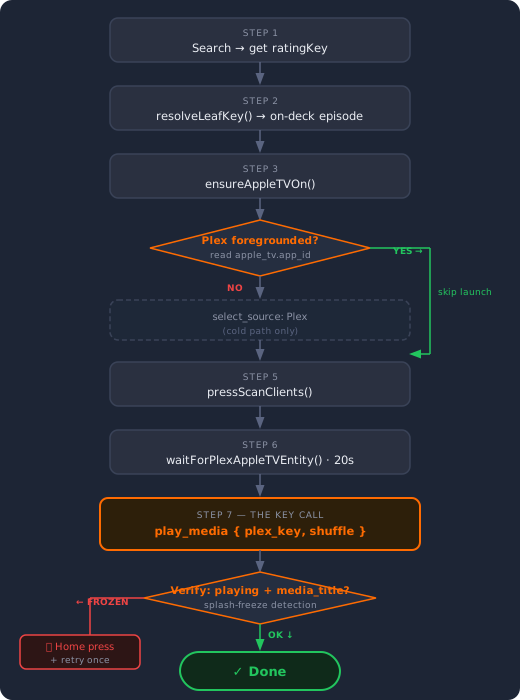
The fix is resolving the show or season to a specific episode before building the payload. The resolution logic (resolveLeafKey) tries four strategies in order:
{basePath}?includeOnDeck=1— canonical path, reads Plex's own on-deck data{basePath}/onDeck— older direct endpoint{basePath}/allLeavesdeep scan — flat list of all episodes, with custom logic: first episode withviewOffset > 60,000ms(actively in progress), then first unwatched after a watched one (typical "next episode" semantics), then first unwatched anywhere, then S01E01 if everything's been watched- Show ratingKey passthrough as last resort — Plex Server picks something
Strategy 3 is what fixed Arrested Development. The custom picker doesn't rely on Plex's /onDeck endpoint at all — it reads raw watch state and makes its own decision about what "next episode" means.
The splash-freeze verifier
Even with the HA Plex integration path, the splash-freeze bug doesn't fully go away. It manifests on the deep link fallback path, and it can also trigger if you call select_source: Plex on an Apple TV that already has Plex running — tvOS interprets a launch command for an already-running app as a reload.
The verifier catches this. After play_media fires, the orchestrator polls media_player.plex_plex_for_apple_tv_apple_tv until it sees:
state ∈ {"playing", "paused", "buffering"}, ANDattributes.media_titleis a non-empty string
The media_title check is the tell. When Plex freezes on the splash screen, the audio pipeline opens (so state flips to "playing") but the now-playing UI never bootstraps (media_title stays empty). Without that check, a frozen Plex would falsely report success.
If verification fails, the flow presses the Home button to evict the stuck card, waits 1.5 seconds, and retries the launch. One retry. If that also fails, it returns an error with a human-readable description instead of silently claiming it worked.
The foreground guard solves the reload trigger: before calling select_source: Plex, the orchestrator reads media_player.apple_tv.app_id. If it's already com.plexapp.plex, skip select_source. Plex is already up — don't touch it.
The full flow
The complete sequence for "play Arrested Development":
And when it works, it's exactly as it should be: say the thing, it plays.
One more thing that bit me
The HA Plex integration creates a media_player entity for every active Plex session across every shared account. I have a lot of Plex users (the Plex premium plan lets you share with friends and family). That means dozens of entities getting created and destroyed as different people start and stop watching — none of which J.A.R.V.I.S. needs to control.
The fix: in the Plex integration settings, set Monitored Users to only my own account, enable "Ignore new managed/shared users", and enable "Ignore Plex Web clients". Now the only entity that gets created is my Apple TV's Plex client. The entity registry stays clean and the integration doesn't get confused by transient sessions from users on different continents whose playback J.A.R.V.I.S. has no reason to touch.
For monitoring what other users are watching — bandwidth, watch history, stream count — that's what Tautulli is for. J.A.R.V.I.S. already has Tautulli tools for exactly that.
This is only half the battle
This post covers video — getting Iron Man to play on the Apple TV. That part is solved.
The other half is music. Saying "play Boom Bap Instrumentals" and having it actually shuffle on the Sonos required a completely different stack: a DLNA bridge called SonoPlay that makes Sonos appear as a native Plex player, a PlexAmp Headless instance for shared phone and voice control, Icecast2 as a persistent radio server, and a specific Sonos URL protocol (x-rincon-mp3radio://) that was the only way to keep the stream alive across track changes and reconnects.
That saga involves its own set of failures, its own set of undocumented protocols, and honestly a more interesting audio quality rabbit hole than I expected. It's the next post — coming soon.
On the J.A.R.V.I.S. project
I'm deep in the middle of building this, and what's on the project page is genuinely just the surface of it. There's the homelab control layer, the Home Assistant integration, Plex + Sonos media control, a unified dashboard, a mobile robot in progress, local LLM inference, and a lot more context I want to write about properly.
This particular problem felt worth sharing on its own because it's self-contained and genuinely tricky. If you're building something similar — an AI assistant that actually controls your media stack, not just wraps an API — hopefully some of this is useful. The plex_key short-circuit in process_plex_payload alone would have saved me a week if I'd known about it.
And if you're the one other person who has had to deal with a frozen Plex splash screen, silent MRP shuffle commands, and a stale on-deck endpoint all at the same time: I see you, and the code is documented.